Subtotal $0.00

A logo can look sharp on your laptop but turn blurry the moment it is printed on a large banner. That is one of the most common problems businesses face when working with low-resolution artwork.
Expert vector art services solve this problem by transforming pixel-based images into clean, scalable graphics. Instead of relying on fixed pixels, vector artwork uses paths, curves, and shapes that can be resized without losing quality.
Whether you need a logo recreated, artwork prepared for printing, or graphics converted into editable formats, professional vectorization can give your designs a cleaner and more flexible foundation.
What Are Expert Vector Art Services?
Expert vector art services involve professionally creating, tracing, converting, or refining artwork into vector graphics.
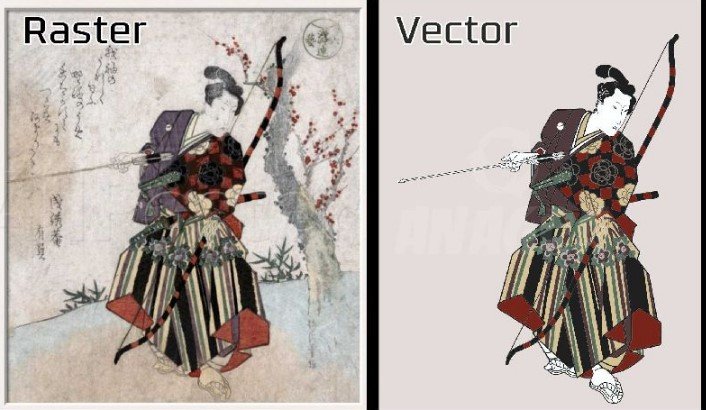
Unlike raster images such as JPG and PNG files, vector artwork is built from mathematical paths. This allows the design to remain sharp when enlarged or reduced.
Common vector formats include:
- AI
- EPS
- SVG
- CDR
Professional vectorization is more than clicking an automatic tracing option. A skilled designer reviews the artwork, rebuilds shapes, adjusts curves, removes unnecessary points, and makes sure the final file is practical for its intended use.
Why Do Businesses Need Vector Artwork?
High-quality graphics are important across many industries. A single logo may appear on a website, business card, product package, uniform, sign, and social media profile.
Using a properly prepared vector file makes it easier to maintain a consistent appearance across all these applications.
Maintain Sharp Quality at Any Size
Vector graphics can be scaled from a small icon to a large billboard without becoming pixelated.
This flexibility is one of the biggest advantages of professional vector artwork.
Create Editable Designs
A properly created vector file can contain separate shapes, paths, and colors. This makes future editing easier.
For example, a designer may be able to change a logo color or modify an individual element without rebuilding the entire design.
Improve Printing Results
Professional printing often requires clean, production-ready artwork. Vector files provide precise edges and shapes that are suitable for many printing processes.
Build a Consistent Brand Identity
Businesses often use the same logo in many places. Having a clean master vector file helps maintain consistent proportions, colors, and details.
What Do Expert Vector Art Services Include?
The exact service depends on the artwork, but professional vector work commonly includes several tasks.
Raster to Vector Conversion
A JPG, PNG, or other raster image can be recreated as vector artwork.
The designer identifies important shapes and rebuilds them using paths and curves.
Logo Vectorization
Old or low-resolution logos are often converted into clean vector files for modern branding and printing.
This can be especially useful when the original editable logo file is missing.
Vector Redrawing
Some artwork cannot be converted accurately through automatic tracing. In these cases, the design may need to be manually redrawn.
Manual recreation can provide better control over curves, proportions, and small details.
Color Separation
Artwork may need to be separated into individual colors for specific production methods.
Accurate color separation can be important for screen printing and other commercial applications.
Vector Cleanup
Existing vector artwork may contain unnecessary anchor points, rough curves, duplicate shapes, or other problems.
Vector cleanup focuses on making the file cleaner and easier to edit.
How Does Professional Vectorization Work?
When you use expert vector art services, the process usually involves several stages.
1. Artwork Assessment
The designer examines the source file and determines how it should be recreated.
They consider image quality, complexity, colors, details, and the intended final use.
2. Shape and Path Creation
Important elements are rebuilt using vector paths, geometric shapes, and curves.
This stage requires attention to proportions and alignment.
3. Curve Refinement
Poorly created curves can make even a simple logo look unprofessional.
The designer adjusts anchor points and handles to create smoother outlines.
4. Color Matching
Colors are reviewed and recreated according to the project’s requirements.
For commercial branding, accurate colors can be especially important.
5. Detail Cleanup
Unnecessary points, overlaps, gaps, and unwanted elements are removed.
The goal is to create artwork that is visually clean and technically useful.
6. Final Quality Check
The completed vector artwork should be checked at different sizes and, when relevant, tested for its intended production method.
Automatic Tracing vs. Expert Vectorization
Automatic tracing tools can be convenient, especially for basic artwork. However, they do not always produce production-ready results.
An automatic trace may create:
- Too many anchor points
- Uneven curves
- Unwanted shapes
- Incorrect colors
- Overlapping paths
- Difficult-to-edit artwork
Expert vectorization involves human judgment.
A designer can decide which details matter, which shapes should be simplified, and how the artwork should be structured.
Think of automatic tracing as using a rough sketch. Expert vector artwork is the cleaned-up drawing that is ready to be used.
Which Artwork Can Be Converted to Vector?
Many types of artwork can be recreated as vector graphics.
Common examples include:
- Company logos
- Product labels
- Business cards
- Icons
- Illustrations
- Line drawings
- Mascots
- Badges
- Signs
- Apparel graphics
- Promotional artwork
Simple graphics are generally easier to convert than detailed photographs.
Photorealistic images contain thousands of colors, textures, and subtle changes. Recreating them as practical vector artwork may require more artistic judgment and may not always be the best approach.
Benefits of Hiring Expert Vector Art Services
Professional vectorization can provide several practical advantages.
Better Accuracy
Experienced designers can carefully recreate proportions, curves, colors, and other important details.
Cleaner Files
A professionally prepared vector file is usually easier to edit and reuse.
Flexible Scaling
The artwork can be enlarged or reduced without the quality loss associated with raster images.
Multiple File Formats
Depending on your needs, you may require AI, EPS, SVG, PDF, or another format.
Having the appropriate files available can make future projects easier.
Production-Ready Artwork
Professional vector files can be prepared according to the requirements of printing, signage, apparel, packaging, and other applications.
Vector Artwork for Printing
Vector graphics are widely used in print design because they can maintain sharp edges at different output sizes.
For example, the same logo might be used on:
- Business cards
- Flyers
- Posters
- Product packaging
- Vehicle graphics
- Large banners
- Store signage
Instead of creating separate artwork for each size, a clean vector master file can provide a flexible starting point.
Vector Artwork for Embroidery
Vector graphics and embroidery files are different, but vector artwork can be a useful starting point for embroidery digitizing.
A vector file defines shapes and paths. An embroidery file contains stitch instructions for a machine.
When a vector design is prepared for digitizing, its shapes can help a digitizer determine areas such as:
- Borders
- Fill regions
- Lettering
- Design sections
- Color areas
Some fine details may need to be simplified because thread cannot reproduce every tiny graphic element.
How to Prepare Your Artwork for Vector Conversion
You can make the process easier by providing useful source material.
Provide the Best Image You Have
A high-resolution image gives the designer more information about the original artwork.
If you have the original artwork instead of a screenshot, provide it.
Explain the Intended Use
Tell the designer whether the artwork will be used for printing, embroidery, signage, websites, packaging, or another purpose.
The final file can then be prepared with that application in mind.
Identify Important Colors
If your brand has specific colors, provide the relevant color references whenever possible.
Mention Required Formats
If a printer or manufacturer requires a specific format, mention it before the work begins.
How to Choose the Right Vector Art Service
Not every vectorization service provides the same level of quality.
Before choosing one, consider these factors:
- Portfolio: Look for examples similar to your project.
- Manual editing: Ask whether complex artwork is manually refined.
- File formats: Confirm that the required formats are available.
- Revisions: Understand how corrections and revisions are handled.
- Turnaround: Choose a realistic delivery time based on complexity.
- Communication: Make sure your requirements can be clearly explained.
Price is important, but the cheapest option is not always the most economical. A poorly prepared file may require additional work later.
Common Vector Art Mistakes to Avoid
Even experienced designers need to watch for technical problems.
Avoid:
- Excessive anchor points
- Jagged curves
- Unnecessary overlapping shapes
- Incorrect proportions
- Random color variations
- Hidden objects
- Poorly organized artwork
- Converting everything through automatic tracing
A vector file should not only look good. It should also be practical to edit, share, print, and reuse.
When Should You Use Expert Vector Art Services?
Professional vectorization is particularly useful when the artwork is important to your business or needs to meet production requirements.
Consider using a professional service when:
- Your logo is blurry or pixelated.
- You lost the original vector file.
- Your artwork needs large-format printing.
- You need an editable logo.
- Your design contains complex shapes.
- You need multiple vector formats.
- Your existing vector file needs cleanup.
- Artwork must be prepared for commercial production.
For simple icons, basic software may be enough. For important business artwork, professional help can save time and reduce errors.
Final Thoughts
Expert vector art services can turn rough, pixelated, or outdated artwork into clean graphics that are easier to scale, edit, print, and reuse.
The real value is not simply changing a JPG into an EPS or SVG file. Good vectorization involves careful shape creation, smooth curves, accurate colors, clean paths, and attention to how the artwork will eventually be used.
Whether you need a logo recreated, an old design cleaned up, or artwork prepared for professional production, starting with a properly created vector file can make every future design task easier.
FAQs
1. What are expert vector art services?
Expert vector art services professionally convert or recreate raster images and existing artwork into clean, scalable vector graphics such as AI, EPS, SVG, or PDF.
2. Can any image be converted into vector artwork?
Many images can be recreated as vectors, but simple logos, icons, illustrations, and line drawings are usually easier than detailed photographs.
3. Is manual vectorization better than automatic tracing?
For complex or commercially important artwork, manual vectorization often provides better control over curves, shapes, colors, and file structure than automatic tracing.
4. What is the best vector file format?
It depends on the intended use. SVG is useful for digital applications, while AI and EPS are commonly used for professional design and printing workflows. PDF can also be useful for sharing and production.
5. How long does professional vectorization take?
The turnaround depends on the artwork’s complexity, number of colors, level of detail, and required formats. Simple logos generally require less work than detailed illustrations.