Subtotal $0.00

Printers do not fail without warning. Most issues start inside the drum unit or imaging unit. If you run a business in Canada, you need to understand how these parts work, when to replace them, and where to source reliable supplies. This matters for print quality, cost control, and workflow stability.
This piece explains everything you need to know about the drum unit and imaging unit in Canada. You will learn how they function, how they differ, when to replace them, and how services from Toner Ink Canada help you stay productive.
Understanding the drum unit and imaging unit in modern printers
Laser printers rely on precise internal parts to create sharp prints. Two critical components are the drum unit and imaging unit.
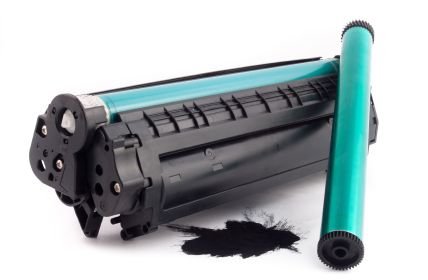
A drum unit is a cylindrical part that transfers toner onto paper. It uses an electrostatic charge to attract toner particles and form text or images.
An imaging unit often combines the drum with other elements. These include developer rollers and sometimes toner reservoirs. Many printer brands use imaging units instead of separate drums.
Key difference you need to know
Some printers use separate toner and drum units. Others use a single imaging unit.
Separate system
• Toner cartridge holds powder
• Drum unit handles image transfer
• You replace them at different times
Combined system
• Imaging unit includes drum and developer
• You replace the whole unit at once
Brands like Brother often use separate drums. Brands like HP and Canon often use combined imaging units.
Why this matters for Canadian users
• Cost control becomes easier with separate units
• Maintenance becomes simpler with combined units
• Availability varies across Canadian suppliers
How the drum unit works step by step
Understanding the process helps you diagnose issues fast.
Charging phase
• The drum gets a uniform electrical charge
• This prepares the surface for image formation
Exposure phase
• Laser writes the image onto the drum
• Charged areas change based on the print design
Development phase
• Toner sticks to the charged pattern
• This forms the visible image
Transfer phase
• Paper passes under the drum
• Toner transfers onto paper
Fusing phase
• Heat and pressure bond toner to paper
Common signs your drum unit needs replacement
Print quality tells you everything. Watch for these issues.
• Faded prints even after replacing toner
• Repeating marks at equal distances
• Black or gray streaks across pages
• Background shading
• Blurry text edges
Example
You print invoices daily. Text starts repeating faintly every few centimeters. This points to a worn drum surface.
Typical drum life
• 10000 to 50000 pages, depending on model
• Heavy usage reduces lifespan
• Poor quality toner accelerates wear
When imaging units fail
Imaging units show similar issues, but often more severe.
• Entire pages look dull
• Uneven toner distribution
• Ghost images appear
• Frequent print errors
Because imaging units include more parts, failure affects multiple functions at once.
Cost comparison in Canada
Understanding cost helps you plan better.
Separate drum system
• Lower cost per replacement
• Replace the drum less often than the toner
• Ideal for high volume printing
Imaging unit system
• Higher upfront replacement cost
• Less frequent maintenance decisions
• Simpler for small offices
Real-world scenario
A small business in Toronto prints 2000 pages per month.
• Separate drum system saves money over time
• Imaging unit system reduces maintenance effort
Choosing the right option depends on your workload.
Importance of quality supplies in Canada
Low-quality components damage printers and increase costs.
Risks of poor-quality drum or imaging units
• Short lifespan
• Leakage of toner
• Internal printer damage
• Voided warranty
Reliable suppliers in Canada offer tested products that match OEM standards.
How Toner Ink Canada supports your printing needs
Toner Ink Canada provides solutions tailored for businesses and individuals.
What you get
• Compatible drum units for major brands
• Imaging units with tested performance
• Fast delivery across Canada
• Competitive pricing
• Customer support for product selection
Practical benefit
You avoid guesswork. You get the right part quickly and reduce downtime.
How to replace a drum unit
You do not need technical expertise. Follow a simple process.
Step-by-step process
• Turn off the printer
• Open the front cover
• Remove toner and drum assembly
• Separate toner from drum
• Insert toner into the new drum
• Place the assembly back into the printer
• Close the cover and reset the counter if required
Tip
Always reset the drum counter. Otherwise, the printer may still show a warning.
How to replace an imaging unit
This process varies slightly by brand but remains simple.
Basic steps
• Power off the printer
• Open access panel
• Remove old imaging unit
• Insert the new unit carefully
• Close panel
• Power on and run a test print
Avoid touching the drum surface. Oils from your fingers can damage it.
Maintenance tips to extend lifespan
You can increase the life of both units with proper care.
• Keep the printer in a dust-free area
• Use high-quality toner
• Avoid frequent power cycling
• Print regularly to prevent drying issues
• Store supplies in a cool, dry place
Example
An office that prints daily sees fewer issues than one that prints once a week. Regular use keeps components active.
Environmental impact in Canada
Canada emphasizes sustainable practices. Printer components play a role.
Responsible actions
• Recycle used drum and imaging units
• Use remanufactured products when possible
• Buy from suppliers with recycling programs
Toner Ink Canada supports eco-friendly practices by offering recyclable options.
Best printer brands using drum or imaging units
Understanding brand differences helps you choose wisely.
Brother
• Uses separate drum units
• Lower long-term cost
• Ideal for high-volume users
HP
• Often uses imaging units
• Simple replacement process
• Good for small offices
Canon
• Uses combined cartridge systems in many models
• Easy maintenance
• Higher per unit cost
Lexmark
• Offers both systems
• Strong performance in business environments
Choosing depends on your printing volume and maintenance preference.
Common mistakes to avoid
Avoid these errors to save money and prevent damage.
• Replacing toner when the drum is the issue
• Ignoring warning messages
• Buying incompatible units
• Touching the drum surface during installation
• Using extremely cheap supplies
Quick checklist before buying
Use this checklist to make the right purchase.
• Confirm printer model number
• Check if you need a drum or an imaging unit
• Verify page yield
• Compare supplier reliability
• Check warranty options
Why Canadian businesses rely on reliable supply chains
Delays in supplies disrupt operations. Reliable suppliers ensure continuity.
Key factors
• Fast shipping across provinces
• Stock availability
• Accurate product matching
• Technical support
Toner Ink Canada meets these needs with consistent service and inventory.
Future of printing components
Printing technology continues to evolve.
Trends to watch
• Longer-lasting drum coatings
• More integrated imaging systems
• Smart printers that track component health
• Eco-friendly materials
These changes aim to reduce cost and environmental impact.
Frequently asked questions
What is the difference between the drum unit and the imaging unit
A drum unit is a single component that transfers toner to paper. An imaging unit includes the drum plus additional parts like developer rollers.
How often should I replace a drum unit?
Most drum units last between 10000 and 50000 pages. Check your printer manual for exact numbers.
Can I use compatible drum units in Canada?
Yes. High-quality compatible units work well and cost less. Choose trusted suppliers to avoid issues.
Why does my printer still show a drum error after replacement
You likely need to reset the drum counter. Each printer has a specific reset method.
Is it better to choose a printer with a separate drum unit
If you print in high volume, separate units reduce long-term cost. If you want simplicity, choose an imaging unit system.
Where can I buy a drum unit and an imaging unit in Canada
Toner Ink Canada offers a wide range with fast delivery and support.
Final thoughts
Drum units and imaging units control your print quality and cost. Understanding how they work helps you avoid downtime and wasted money.
Focus on three things
• Choose the right type for your printer
• Replace components at the right time
• Buy from a reliable Canadian supplier
If you want consistent prints and fewer disruptions, source your supplies from Toner Ink Canada. You get dependable products, fast shipping, and support that keeps your printing smooth.